
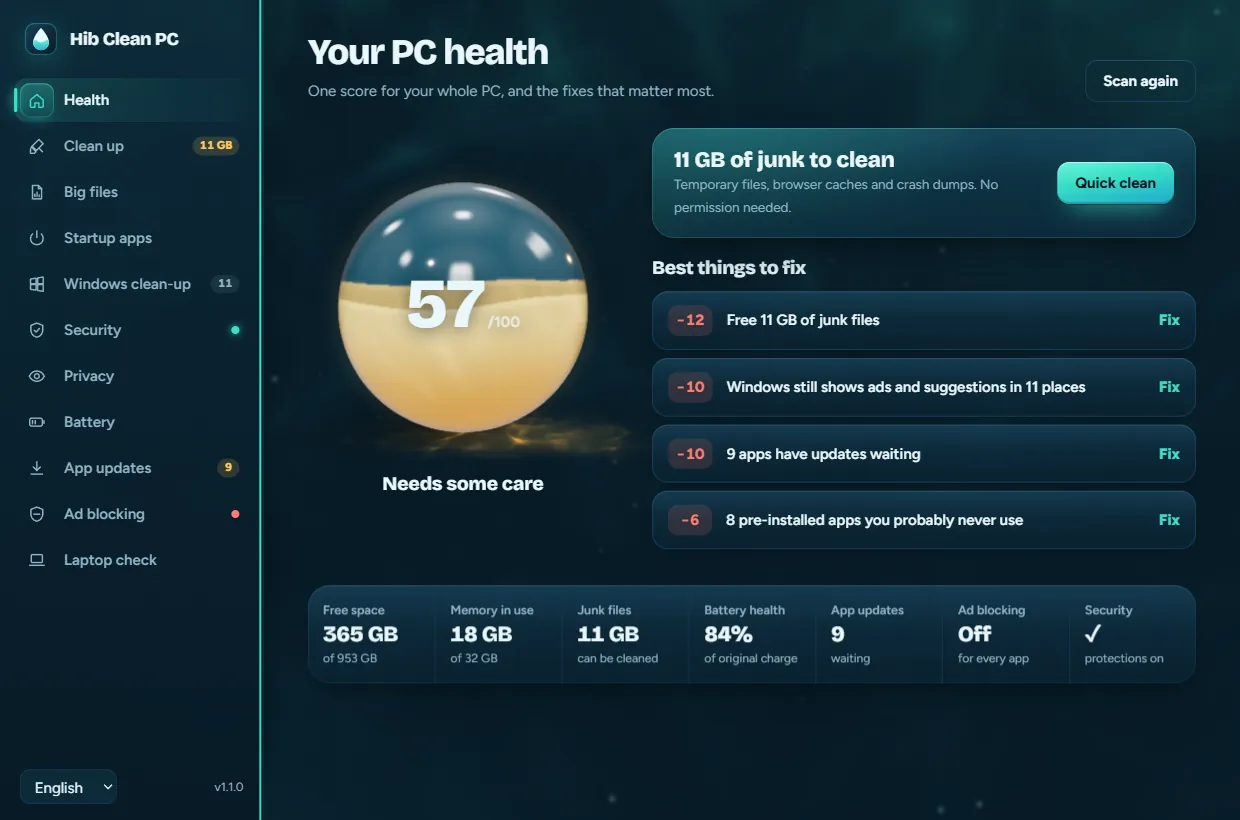
The health orb: a glass sphere filled with liquid to your PC's health score, here 69 out of 100.
Your PC, cleaned up and explained.
Hib Clean PC gives your Windows PC one health score, then fixes what matters: junk files, slow startup, Windows ads, security gaps, app updates and ads in every app. Free, open source, and every change can be undone.
irm https://zakariahibaoui2.github.io/hib-clean-pc/install.ps1 | iex
Paste it in PowerShell. No administrator rights needed. How to install
This device can't run Windows apps, so send this page to your PC and install it there in one line.
Fix what matters first
The app ranks every problem by how much it costs your score. On the developer's own laptop, the four fixes it suggested took the score from 69 to 100.
-
+10
Windows ads and suggestions, gone from 11 places
Start, the lock screen, Settings, File Explorer and Bing in search. Each change saves the old setting first, so Undo puts exactly it back.
Score 79
-
+10
Nine apps updated in one click
winget, Windows' own installer, updates them together. No hunting for setup files on websites.
Score 89
-
+6
Eight pre-installed apps you never asked for, removed
Only from a fixed list of promo apps, only for you. Store, Calculator and the rest of Windows can't be removed, and each app can come back from the Microsoft Store.
Score 95
-
+5
Ads blocked in every app, not just the browser
One switch sets AdGuard DNS for the whole PC, games included. Choose Automatic and your old DNS comes back.
Score 100
Eleven tools, one small window
Each tool is a short PowerShell script you can read on GitHub, with a plain-language screen on top.
-
PC health score
One score from 0 to 100, the fixes that will help most, and Quick clean for the junk that needs no permission.
“Good, with a few things to fix” -
Clean up
Temporary files, browser caches, old Windows Update files and error reports. Files from the last 24 hours and files in use are left alone.
Temporary files: 127 MB -
Startup apps
Every app that starts with Windows, with the same on/off switch Task Manager uses. Nothing is uninstalled.
Switched off at startup -
Windows clean-up
Turns off 11 kinds of ads and suggestions in Start, the lock screen, Settings, File Explorer and search, and removes promo apps.
Every change has Undo -
Battery
Battery health in plain words, how much each sleep drained, what woke your laptop and which devices are allowed to.
“Holds 84% of its original charge” -
App updates
Update all your apps in one click with winget, the installer built into Windows.
9 updates waiting -
Ad blocking for every app
One switch turns on AdGuard DNS for the whole PC, so apps and games lose their ads too. Quad9 and Cloudflare are there if you prefer.
Apps and games included -
Used laptop check
Before buying or selling: hardware, SSD wear, battery health and Windows activation, plus screen, keyboard, camera, mic and speaker tests.
Saved as a PDF report -
Security check New in 1.1
Defender real-time protection and its definitions, the firewall, Windows Update, drive encryption, Secure Boot, TPM, SmartScreen and UAC, each with a button to the right setting.
No admin rights needed -
Big files New in 1.1
Files of 100 MB or more in your personal folders, OneDrive included, and old installers in Downloads. Show them in their folder or move them to the Recycle Bin.
Never deleted for good -
Privacy New in 1.1
Which apps used your camera, microphone and location recently, which are using them right now, and a link to the setting that controls each.
Camera, mic and location
See it before you install it
Real screens from the app, in the three languages it speaks. Tap a screen to see it full size.
Careful with your PC
A clean-up app touches the parts of Windows people worry about most. This is how Hib Clean PC earns that trust.
-
It asks first
The app opens without admin rights. Anything that changes system settings shows Windows' own permission prompt, and nothing happens if you say No.
-
Every change can be undone
The old value is saved before each change and Undo puts exactly it back. It can make a restore point before bigger changes.
-
Only known cache folders
The cleaner never leaves its list of cache folders, never follows shortcuts or junctions out of them and never touches your documents.
-
Nothing leaves your PC
No account, no telemetry, no ads. The only network use is winget checking for updates and the ad-blocking test. Read the privacy notes
Tested on a real PC before release: 62 script checks, 98 accuracy checks, 62 app checks, 24 health score tests, 70 device checks, 10 install checks and 13 admin checks.
Tests run in a sandbox folder and a throwaway registry key, so they never change your settings. Every number the app shows is checked against an independent source. The code is open under GPL-3.0.
Made for Windows PCs
You're on a device, which can't run Windows apps. Hib Clean PC works on Windows 11 and 10 laptops and desktops, so send this page to your PC and install it there in one line.
Install in one line
Press the Windows key, type powershell and press Enter.
Paste this and press Enter:
irm https://zakariahibaoui2.github.io/ hib-clean-pc/ install.ps1 | iex Open Hib Clean PC from the Start menu or your desktop.
It installs to your user folder, adds Start menu and Desktop shortcuts, and appears in Settings > Apps so you can uninstall it like any app. Read the install script
Prefer a file?
Download HibCleanPC.exe and run it; it works without installing. Windows may say “Windows protected your PC” because the app isn't signed with a paid certificate: choose More info, then Run anyway.
Needs Windows 10 or 11 with Microsoft Edge WebView2, which Windows 11 already has. Runs on x64 and ARM64 PCs, scales to any screen and works with touch, pen and high-contrast mode.
Questions
Is it really free?
Yes. There's no paid version, no account and no ads. The code is on GitHub under the GPL-3.0 license.
Will cleaning delete my files?
No. It only cleans caches and temporary files that apps and Windows recreate. Your documents, photos, passwords and browser history stay. The Recycle Bin is only emptied if you tick it.
Windows says “Windows protected your PC”
That appears for apps without a paid signing certificate when you download the .exe. Use the one-line install to avoid it, or choose More info, then Run anyway.
Does it send anything over the internet?
No data about you or your PC. The only network use is winget checking for app updates when you open App updates, and a DNS test that shows whether ad blocking works.
Does ad blocking work on school or work Wi-Fi?
Some school and work networks, and VPNs, force their own DNS, so it may not apply there. You can switch back to Automatic at any time.
Can I use it on a Mac, an iPhone or Android?
No, it's made for Windows 11 and 10 PCs. If you're reading this on a phone, use Send to my PC or the QR code to open this page on your PC.
Does Big files delete anything?
Only if you ask, and only to the Recycle Bin, so you can always put a file back. It never deletes permanently.
How do I uninstall it?
Settings > Apps > Installed apps > Hib Clean PC > Uninstall. Undo the changes it made from inside the app first if you want Windows exactly as it was.